
If you want to grow your website’s authority, one of the most reliable methods is resource pages link building. Unlike other complex SEO strategies, this method is built on a simple idea: helping people. When you provide a helpful link to a site owner, you aren’t just asking for a favor; you are helping them make their website better for their readers. This is why it remains a top choice for experts who want high-quality results without overcomplicating things.
What Is Resource Pages Link Building?
Resource pages link building is the process of getting backlinks from web pages that collect and share useful links. These pages are designed to help users find helpful content in one place. You will usually see them titled as “resources,” “helpful links,” or “recommended tools.”
For example, if you create a helpful design resource or SEO guide, you can reach out to the creator of a resource page and suggest your content for inclusion. If your content adds value, there is a good chance they will include your link.
These pages act like trusted lists. So when your website gets featured, it builds both authority and traffic.
Why This Strategy Works So Well
The reason this works so effectively is that it solves a major problem for website owners: maintenance. Keeping a list of links up to date is a lot of work. Links break, websites shut down, and information becomes old. When you reach out to a site owner and suggest a fresh, high-quality resource, you are doing the hard work for them.
Most creators appreciate it when you do the “legwork.” If you can show them that your content adds real value to their list, they are very likely to add it. It turns a cold email into a helpful service. This is also a great time to consider why use a backlink monitor tool, as keeping track of these links ensures they stay active and continue providing value to your site over time.
How to Find the Best Resource Pages
To build these links, you first need to find the right pages. You don’t want to just email everyone; you need to find sites that are a “good fit” for your niche.
1. Use Google Search Operators
Google is your best friend here. By using specific “search strings,” you can find hidden resource pages in seconds. Here are some simple ones to try:
- Your Keyword + “useful resources”
- Your Keyword + “helpful links”
- Your Keyword + inurl:resources
- Your Keyword + “best sites”
2. Reverse Engineer Competitors
If a resource page is already linking to your competitor, there is a very high chance they will link to you too. You can use SEO tools like Semrush or Ahrefs to see exactly which resource pages are pointing to other sites in your niche. If their content is good, but yours is better or more modern, you have a perfect “pitch.”
3. Look for “Mini” Resource Pages
Not every resource page is a giant list. Sometimes, a blog post will have a small section at the bottom called “Further Reading” or “Other Places to Learn.” These are often easier to get into because fewer people are targeting them.
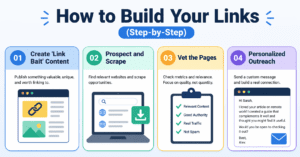
How to Build Your Links (Step-by-Step)
1.Create ‘Link Bait’ Content
Quality first
Before you ask for a link, you need something worth linking to. This could be a comprehensive guide, a free tool, or an informational resource that solves a specific problem.
2.Prospect and Scrape
Build your list
Use the search operators mentioned above to find as many URLs as possible. You can use tools like ScrapeBox or even a simple spreadsheet to keep track of these targets.
3.Vet the Pages
Check for quality
Not every page is a winner. Look at the “Domain Rating” (DR) and “Search Traffic.” If a page is full of dead links or looks like spam, skip it. You want links from sites that are active and healthy.
4.Personalized Outreach
The human touch
Send a friendly email. Don’t use a boring, generic template. Mention something specific about their page and explain exactly why your resource is a “slam dunk” for their audience.
Smart Outreach Tips That Actually Work
One important tip is to contact the right person. Don’t just send emails to general addresses like info@domain.com. Try to find the real person managing the page.
Also, respect their preferred contact method. If they ask you to use a contact form, follow that.
Another smart move is to suggest exactly where your link should go. Many resource pages have sections. If you point out the right section, it makes their job easier.
Tips for a High Success Rate
To ensure your article gets indexed and your links get placed, follow these simple best practices:
- Avoid .edu and .gov unless relevant: These sites are very hard to get into. Stick to high-quality industry blogs and niche directories.
- Focus on Freshness: If a resource page hasn’t been updated since 2015, don’t bother. Look for “active” pages.
- Be a Bridge: Think of yourself as the bridge between your great content and the person who needs to see it.
- Suggest a Resource Links: Many sites have a link that literally says “Suggest a Resource.” These are open invitations! Prioritize these targets first.
Expert Insight: The best link building isn’t just about code or technical tricks; it’s about people. If you treat a webmaster like a person rather than a “target,” your success rate will triple.
Using the Right Tools for Success
Efficiency is key in digital marketing. While you can do everything manually, using the right tools makes the process scalable.
| Tool Type | Examples | Purpose |
| Search/Scraping | Google, ScrapeBox | To find thousands of potential resource pages. |
| SEO Metrics | Ahrefs, Semrush | To check the quality and traffic of the sites. |
| Outreach | Pitchbox, Mailshake | To send and manage your email conversations. |
| Organization | Google Sheets | To keep your data clean with VLOOKUP and master lists. |
By using these tools, you can focus more on the creative side of the job-like writing great emails-and less on the boring data entry.
Final Thoughts
Resource page link building remains one of the most straightforward and honest ways to grow your digital presence. It focuses on community engagement and providing real value to the web.
While some marketers try to take shortcuts with “shotgun” approaches or spammy tactics, the experts who succeed are the ones who pitch with heart and stay consistent. If you create something truly useful and find the right people to show it to, the links will come naturally. It’s all about making the internet a more organized and helpful place, one link at a time.
Need support with resource pages link building?
FAQs
- What is resource pages link building?
Resource pages link building is a method of getting backlinks from pages that list useful links to helpful content. These pages are designed to guide users, so if your content is valuable, it can be added as a trusted resource. - Why is resource pages link building still effective?
It works because it matches the purpose of resource pages. Site owners want to link to helpful content, so if your page improves their list, they are more likely to add your link without much resistance. - How do I find resource pages in my niche?
You can use Google search operators like “keyword + resources” or “keyword + helpful links.” Tools like Ahrefs SEO Toolbar can also help you collect and export search results quickly. - What type of content works best for this strategy?
Informational guides, tools, tutorials, and detailed blog posts usually perform best. The key is to provide real value so that your content fits naturally into a resource list. - How can I improve my chances of getting a link?
Focus on personalization in outreach emails, suggest exactly where your link fits, and always provide helpful content. You can also increase success by pointing out broken links and offering your content as a replacement.