
For any small business owner, the digital world can feel like a giant, confusing place. Even if you offer the best products or services, your business won’t succeed if people can’t find you online. When they search on their phones, visibility is key. This is where local search engine optimization comes into play. If you have asked how to optimize a website for local SEO, you are on the right path. This step will help grow your brand and reach your neighbors.
Local SEO helps your business show up in searches. It reaches customers nearby who need your services. It is the difference between a customer walking into your store or driving to your competitor’s shop. In this guide, we will break down the exact steps you need to take to win the local market.
Why Local SEO Matters for Your Revenue
Over my years helping local brands, I’ve noticed many businesses struggle. They often focus too much on the global market and not enough on their own street. When a person picks up their phone to look for “pizza near me” or “plumber in my city,” they have a high intent to buy. They aren’t browsing; they are ready to take action.
If your business shows up at the top of those results, you gain immediate trust. This is because search engines like Google rank relevance and proximity. They want to show the user the best, closest option. By learning how do you optimize a website for local seo, you ensure that your business is that top choice. This results in more phone calls and foot traffic. In the end, it brings more sustainable revenue for your company.
1. Claim and Fix Your Google Business Profile
I like to think of the Google Business Profile as the digital front door of your shop. It is often the very first thing a customer sees before they even click on your website. This profile shows your address. It lists your phone number, hours, and customer reviews.
If your profile says you close at 5:00 PM but your website says 6:00 PM, search engines get confused and lose trust in you. A verified and complete profile is the most important step in local SEO. Some people buy website traffic for a quick boost. But nothing beats a clean, accurate, and active Google Business Profile.
2. Create Pages for Specific Locations
If your business serves several cities or neighborhoods, don’t use one homepage. Make a unique page for each area. I have found that the biggest benefits come from creating location-specific web pages.
If you’re a physical therapist in Cleveland, name your page “Physical Therapy in Cleveland.” This helps search engines see your location and service clearly. It acts like a magnet for local traffic. But do not overdo it. Google may see you as creating “spam” if you make many low-quality pages for each small village. This may lead them to penalize your site. Focus on your 2 or 3 most profitable areas first and build high-quality content for them.
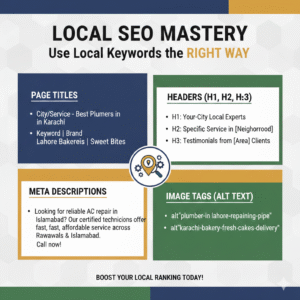
3. Use Local Keywords the Right Way
To master how to optimize a website for local SEO, you need to understand the language of search engines. This means using local keywords in the right places.
You should include your city or neighborhood name in:
- Page Titles: The main name of your page that appears in search results.
- Headers: Use H2 and H3 tags to organize your content (like the headings in this article).
- Meta Descriptions: The short summary that appears under your link on Google.
- Image Tags: Even the descriptions of your photos should mention your location.
Think like a customer. Instead of “Wedding Photographer,” use “Wedding Photographer in Seattle.” This small change helps the search engine know where your website fits and who should see it.
4. Make Your Site Easy to Use on a Phone
Almost everyone looking for a local business is doing it on a smartphone while they are on the go. This means your website must be mobile-friendly. If your site takes too long to load or if the buttons are too small to click, people will leave immediately.
Google sees “mobile responsiveness” as an important ranking factor. It helps them decide who gets the top spots. A fast, easy-to-read mobile site is no longer a luxury; it is a requirement. If your site is friendly to handheld devices, you are much more likely to turn a searcher into a customer.
5. Get Links from Other Local Websites
In the SEO world, a “link” is like a vote of confidence. When another website links to yours, it tells Google that your site is trustworthy. For local SEO, you want links from other local organizations.
Try to get links from:
- Your local Chamber of Commerce.
- Local news websites or blogs.
- Community event pages or local charities you support.
These local backlinks prove that you are an active part of the community. It builds your digital reputation in a way that global brands cannot easily copy.
6. The Power of Customer Reviews
Visibility is built on trust, and nothing builds trust faster than customer reviews. When you do a great job, ask your clients to leave a review and mention the service they received and the city they are in.
Don’t be afraid of the occasional piece of criticism. The way you respond to a bad review is as important as the praise you get in a good one. It shows that you are a real person who cares about their customers. This interaction makes your business look active and reliable, which helps your ranking.
7. Connect with Your Community Offline
Even though we are talking about digital optimization, your physical presence matters. Volunteering at local events or joining networking groups creates a real-world connection. When people meet you in person, they are more likely to search for your name online later. This “branded search” shows Google that you are a popular local business. This boosts your local SEO efforts.
Common Mistakes to Avoid
As you work on how do you optimize a website for local seo, watch out for these common traps:
- Keyword Stuffing: Do not repeat your city name fifty times in one paragraph. It looks bad to readers and looks like spam to Google.
- Inconsistent NAP: NAP stands for Name, Address, and Phone Number. It must be exactly the same everywhere—on your site, on Facebook, and in business directories.
- Ignoring Your Profile: If you create your Google profile and don’t check it, your info will get outdated. Keep it fresh with new photos and updates.

Tracking Your Success
You cannot improve what you do not measure. Use free tools like Google Search Console to see how people are finding you. Look at your website traffic to see which cities your visitors are coming from. Are people clicking the “call” button on your profile? Are they asking for directions? These metrics will show you exactly what is working and where you need to put more effort.
Should You Hire an Agency?
Managing all these moving parts can be a lot of work. If you find it takes too much time, you could use a local marketing agency like haxestech.com . Experts can refine your strategy. They check your performance and help keep your site at the top of local search results.
In short, local search optimization is about being clear. It’s also about being consistent and helpful in your community. Follow these easy steps to ensure your business is the first choice for help in your town. It takes a little time and effort, but the reward is a steady stream of local customers who are ready to buy.
Frequently Asked Questions
Q1: What is local SEO?
A1: Local SEO is the process of optimizing your website so that it appears in search results for people looking for services or products in your area.
Q2: How do you optimize a website for local SEO?
A2: You optimize a website for local SEO by creating location-specific pages, using local keywords, optimizing meta descriptions, ensuring mobile-friendliness, and collecting reviews.
Q3: Why is a Google Business Profile important for local SEO?
A3: A Google Business Profile acts as the front door to your website. It helps Google show your business in local search results, maps, and directions.
Q4: How many location-specific pages should I create?
A4: Focus on a minimum pages strategy, ideally under 12. Too many pages can trigger diminishing returns or penalties from Google for doorway pages.
Q5: Do mobile-friendly websites affect local SEO?
A5: Yes, mobile-friendly websites improve user experience, and Google uses mobile responsiveness as a ranking factor in local search results.