
If you’ve ever wondered can adding more pictures can increase SEO, you’re not alone. Many website owners, bloggers, and businesses want to boost their Google rankings. After doing many SEO audits and content projects, I know images affect SEO. But, it’s not how most think. Uploading more pictures won’t guarantee that your page rises to the top. Images can be powerful tools for boosting your SEO. When used well, they provide large support for your performance.
Search engines have evolved far beyond reading text alone. Today, Google looks at how users engage with your content. It checks how fast your pages load and how accessible your site is. Plus, it considers if visitors find value in what you share. Images play a key role in SEO. That’s why it’s important to understand their impact now more than ever.
Why the “More Pictures = Better SEO” Idea Is Misleading
Many site owners fall into the trap of thinking SEO has shortcuts. Add more keywords and Add more backlinks. Add more images. Unfortunately, this mindset often leads to disappointing results—or worse, ranking drops.
From a visitor’s view, pages full of extra visuals look cluttered and confusing. Imagine looking for a guide and finding a page full of random stock photos that don’t help at all. Most users will hit the back button almost immediately. A quick exit raises the bounce rate. Google sees this as a sign that the page isn’t useful.
Large, unoptimized images create another problem: slow loading times. Slow pages frustrate users, especially on mobile. Also, page speed is a key ranking factor. I’ve seen sites lose visibility because their images were too heavy. In that case, adding more pictures actually hurt SEO instead of helping it.
The truth is simple: quality, relevance, and optimization matter far more than quantity.
How Images Support SEO When Used in the Right Way
So if it’s not about volume, how do images truly help? Images support SEO in indirect but powerful ways. They improve user experience and they boost engagement signals. They also help search engines understand your content better.
Users who see clear visuals or charts usually scroll more. They also read longer. Screenshots and original photos help too. That increased dwell time sends positive behavioral signals to Google. Google doesn’t rank pages on dwell time. But, steady engagement shows that your content is valuable.
Images also break up large blocks of text. Even well-written articles can feel overwhelming if they’re visually dense. Adding relevant visuals at key points makes your content easier to consume. This leads to better retention and greater satisfaction.
This is where people misunderstand: Can adding more pictures increase SEO? Images don’t rank pages directly. But, they do affect the signals Google uses to assess quality.
Image Search: A Hidden Traffic Opportunity
One of the most overlooked benefits of image optimization is Google Image Search. Optimized images can rank on their own, giving users another way to find your content.
Use descriptive file names, accurate alt text, and proper sizing for your images. This makes them eligible to show up in image search results. This traffic is often highly targeted. Users who click from image search are already interested. This means they’re more likely to engage with your content when they reach your site.
In competitive niches, image search can bring steady traffic. Many competitors miss out because they haven’t optimized their visuals.
Images, E-E-A-T, and Content Trust
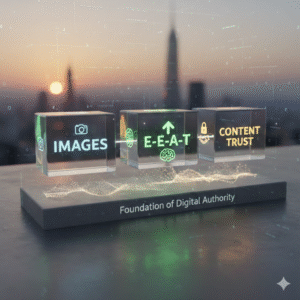
Google now focuses on E-E-A-T Experience, Expertise, Authoritativeness, and Trustworthiness. This change reshapes how content gets evaluated. Images play a subtle but important role here.
Original visuals, screenshots, charts, and photos taken during real use prove experience. They show that the content isn’t generic or recycled. This is especially important for guides, reviews, tutorials, and case studies. I’ve noticed that some average writing beats competitors. This happens when visuals effectively prove real-world expertise.
Overused stock photos can weaken trust. Users have seen them thousands of times. They don’t add credibility, and they fail to prove experience.
On-Page SEO Benefits of Relevant Images
Images also contribute to on-page SEO by providing direct context. Search engines don’t “see” images. They also interpret them. They use elements like captions, alt text, file names, and nearby paragraphs.
When your main topic and keywords match these elements, Google gets it. This helps Google understand your page better. This boosts topical relevance and helps related entities linked to your main keyword.
An image near a section heading, with clear alt text and captions, boosts the section’s meaning. Over time, these signals compound across the page.
Do images enhance rankings through indirect means?
Yes, and this is where the real impact happens. Images influence user behavior, and user behavior influences rankings.
Engaging visuals keep visitors on the page longer. They explore more sections and scroll deeper, too. This lowers the bounce rate and boosts dwell time. Both are strong signs that your content meets user expectations.
Images also improve readability. Content that’s easier to scan is more likely to meet users’ needs quickly. When visitors locate what they need without difficulty, they trust your site more. This makes them likely to return later or share it with others.
These factors support Google’s main goal: giving users the best experience.
Social Sharing, Backlinks, and Visual Assets
Visual content has a greater tendency to be shared. Users share infographics, comparison charts, original photos, and data visuals on social media. People share them with greater frequency than text-only articles.
This increased sharing often leads to natural backlinks. Other websites reference your visuals as supporting material, which strengthens your backlink profile. In broader SEO strategies, strong visual assets boost a page’s value. When paired with tactics like buying Dofollow backlinks, they also enhance link quality.
Backlinks from helpful visuals usually last longer than those from outreach alone.
Practical Image Optimization That Delivers Results
Execution is everything. You should optimize every image before you upload it.
Start with file names. Avoid generic defaults like IMG_12345.jpg. Instead, use descriptive names that reflect the image content and topic. Search engines read hyphens as word separators, so use them to your advantage.
Alt text is critical. It provides a description of the image for visually impaired users. It also helps search engines know what the image shows. Write alt text that’s clear, descriptive, and natural. Avoid keyword stuffing; it hurts usability and can flag your content as spam.
Captions add context. While not every image needs a caption, the ones that do often receive more attention than body text. Use captions to clarify, explain, or support the surrounding content.
Image Size, Speed, and Technical Performance
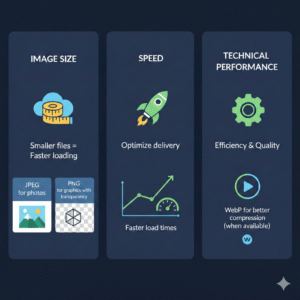
Page speed matters, and images are often the biggest culprit behind slow load times. Large, uncompressed images can destroy performance, especially on mobile devices.
Before uploading, compress images using tools like TinyPNG or ShortPixel.
Choose the right format:
- Use JPEG for photos.
- Use PNG for graphics with transparency.
- Use WebP for better compression when you can.
Responsive images make your visuals fit various screen sizes. This helps performance on all devices. Mobile-first indexing is now standard, so mobile image optimization is essential, not optional.
Strategic Image Placement for Greatest Impact
Where you place images matters as much as how you optimize them.
Images near the top of a page help capture attention quickly. Placing visuals after headings introduces new sections and improves flow. Images help explain complex ideas. They make information easier to grasp.
Always surround images with relevant text. This helps search engines understand the topic. The image and nearby content prove how they relate.
Common Image SEO Mistakes to Avoid
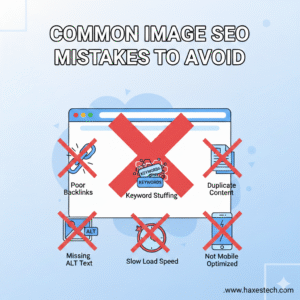
Some mistakes can completely cancel out the benefits of images. Keyword stuffing in alt text creates poor accessibility and harms trust. Uploading massive files slows down pages and damages rankings. The reliance on irrelevant stock photos undermines authenticity and engagement.
Original visuals, like screenshots and custom charts, perform better than generic images. Real photos also add value. They feel authentic, provide value, and support stronger engagement signals.
Images Beyond SEO: Business and Marketing Benefits
While SEO is the focus, strong visuals deliver benefits far beyond rankings. Consistent, high-quality imagery builds brand recognition and professional trust. Visual content boosts engagement on social media. It also improves conversion rates. This happens because it helps users understand products or services better.
In eCommerce and lead-generation sites, product images and graphics impact buying choices. Users want to see before they commit.
The Real Answer to “Can Adding More Pictures Increase SEO?”
So, can adding more pictures increase SEO? The answer is yes—but only when images are relevant, optimized, and used with purpose.
Shifting your mindset from “adding pictures” to “creating a visual experience” changes everything. Images enhance usability, accessibility, engagement, and clarity. So, they help support Google’s ranking principles.
Treat images as strategic assets, not decoration. Optimize them with precision. Make sure they fit your content strategy. Let them help your SEO. They can assist with link building, technical fixes, and improving content quality. Using images well can help your search visibility. They can also support growth over time. Plus, they won’t be distracting.
Frequently Asked Questions
- Can adding more pictures increase SEO?
Yes, adding more pictures can increase SEO when images are relevant, properly optimized, and add context to the content. Images help improve user experience, engagement, and discoverability in image search, which indirectly supports rankings. - Does Google rank pages higher just because they have more images?
No. Google does not reward pages for image quantity alone. Poorly chosen or unoptimized images can actually hurt rankings. SEO benefits come from quality, relevance, and optimization, not from adding images blindly. - How do images help SEO indirectly?
Images improve UX, reduce bounce rate, increase dwell time, and make content easier to scan. These positive user behaviors send strong signals to Google that the page is helpful and relevant. - Can images slow down a website and hurt SEO?
Yes. Large or unoptimized images can slow page speed, which is a known ranking factor. Slow-loading pages frustrate users and may lead to ranking drops, especially after Google core updates. - Do optimized images help with Google Image Search traffic?
Absolutely. Using descriptive file names, proper alt text, and compression makes images discoverable in image search results, driving secondary and often high-quality traffic to your site. - Is alt text important for SEO?
Yes. Alt text helps search engine crawlers understand images and improves accessibility for visually impaired users. It also adds semantic context to the page, supporting on-page SEO.