
Many people think Pinterest is only for DIY crafts or recipes, but it has grown into a powerful platform for online growth. Today, Pinterest Traffic plays a huge role in helping blogs and websites get consistent visitors. Unlike platforms such as Facebook or Twitter, Pinterest works more like a visual discovery tool where people search for ideas, inspiration, and helpful content.
When creators treat Pinterest as a search platform instead of just another social network, they often see their blog visits increase quickly. In fact, strategies used for Pinterest Traffic share similarities with other digital optimization methods, much like how bloggers sometimes focus on topics such as how to improve website loading speed for SEO to attract more visitors through search engines.
Pinterest encourages users to follow topics rather than people. Users create boards where they save helpful pins related to topics they care about. These pins often link back to blogs or websites, which is why Pinterest has become a powerful traffic source for bloggers and online businesses.
Why Pinterest Is Powerful for Blog Traffic
Pinterest has hundreds of millions of active users every month, and billions of searches happen on the platform. A large portion of users are actively looking for ideas, solutions, and inspiration. Because of this behavior, Pinterest users often click through to blog posts to learn more.
Another reason Pinterest works so well is its visual nature. People respond quickly to strong images and creative graphics. When a pin looks attractive and clearly explains the topic, users are more likely to click and visit the original blog.
Pinterest also helps increase brand awareness. Many people discover new websites through pins and later search for the brand again. This means Pinterest can drive both direct traffic and future search traffic.
7 Essential Tips to Drive More Traffic
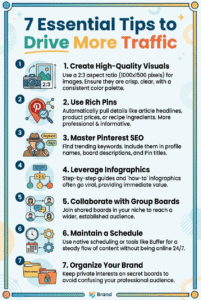
To turn casual scrollers into loyal blog readers, you need a strategy that blends visual appeal with smart organization. Here are the best ways to improve your reach:
- Create High-Quality Visuals: Use a 2:3 aspect ratio (1000×1500 pixels) for your images. Ensure they are crisp, clear, and use a consistent color palette to build brand recognition.
- Use Rich Pins: These automatically pull extra details from your website, such as article headlines, product prices, or recipe ingredients, making your pins more professional and informative.
- Master Pinterest SEO: Treat the platform like a detective. Use the search bar to find trending keywords and include them in your profile name, board descriptions, and Pin titles.
- Leverage Infographics: Step-by-step guides and “how-to” infographics often go viral because they provide immediate value.
- Collaborate with Group Boards: Join shared boards in your niche to get your content in front of a wider, established audience.
- Maintain a Schedule: Use native scheduling or tools like Buffer to keep a steady flow of content without being online 24/7.
- Organize Your Brand: Keep your private interests (like home renovation or nursery ideas) on secret boards so they don’t confuse your professional audience.
The Long-Term Value of Pinterest Traffic
One of the biggest advantages of Pinterest is the lifespan of a pin. On most social media platforms, posts disappear from feeds within hours or days. On Pinterest, however, a single pin can continue sending visitors for months or even years.
This happens because Pinterest acts like a search engine. When users search for a topic, older pins that match the search can still appear. Because of this, creators who focus on Pinterest Traffic often experience steady growth rather than short spikes.
Features like rich pins also help increase clicks. Rich pins display extra information such as headlines, descriptions, and authors directly on the pin, giving users a clearer idea of what they will find on the website.
Creating Pins That Drive Traffic
To attract visitors from Pinterest, the first step is creating high-quality pin images. Strong visuals catch attention quickly and encourage users to stop scrolling. Clear images, bright colors, and readable text overlays often perform better than simple photos.
Pinterest recommends a vertical image format with a 2:3 ratio. A common size used by creators is 1000 × 1500 pixels. Using a consistent color palette and font style also helps people recognize your brand when they see your pins.
Since many users browse Pinterest on mobile devices, pins should remain easy to read on smaller screens. Avoid cluttered designs and focus on clean layouts with enough space between elements.
Writing Pin Descriptions That Attract Clicks
Each pin should include a clear title and description. Think of the description as a short story that explains what the reader will learn after clicking the pin. Good descriptions create curiosity and invite users to explore more.
Keywords are also important because Pinterest works like a search engine. When users type a topic in the search bar, the platform shows pins that include relevant keywords. Adding these keywords naturally in the title and description helps your content appear in search results.
Calls to action such as “read more,” “discover the full guide,” or “learn the steps” can also encourage users to click.
Using Boards to Organize Content
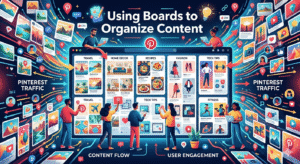
Pinterest boards help organize pins into specific topics. For example, a technology blog might create separate boards for software tips, gadget reviews, and industry news.
Organized boards make it easier for visitors to explore related content. They also help Pinterest understand what your account focuses on, which improves the chances of your pins appearing in search results.
Group boards can also expand reach. These boards allow multiple creators to share content around the same topic. When used correctly, they expose your pins to a larger audience.
Consistency and Scheduling
Consistency is important for growing on Pinterest. Instead of posting many pins at once and then disappearing, it is better to pin regularly over time. This steady activity helps your account stay visible.
Many creators use scheduling tools to plan pins in advance. Scheduling allows pins to be shared throughout the week instead of all at once. Over time, this steady approach helps build audience trust and encourages organic follower growth.
Seasonal planning also helps increase engagement. Creating pins for holidays, events, or seasonal trends ahead of time ensures your content appears when people start searching for those topics.
Pinterest SEO and Keyword Research
Pinterest SEO is a key factor in gaining visibility. The search bar itself can help you discover keywords. When you start typing a topic, Pinterest shows suggested phrases that people frequently search for.
These suggestions can guide your pin titles, descriptions, and board names. When used naturally, these keywords help your pins appear in relevant searches.
It is also helpful to include descriptive text for images on your website. When you pin images directly from your blog, the description often carries over to Pinterest, saving time and helping with optimization.
Measuring Pinterest Performance
Tracking results is important when building a traffic strategy. Pinterest analytics tools provide useful data about how pins perform. These tools show impressions, saves, clicks, and other engagement signals.
By reviewing these numbers, creators can see which pins attract the most visitors. This helps improve future designs, descriptions, and topics.
Some marketers also connect Pinterest with marketing analytics platforms to track deeper results such as website visits, time spent on pages, and newsletter signups.
Building Long-Term Pinterest Traffic
The most successful Pinterest strategies combine creativity with consistent optimization. High-quality visuals, helpful blog content, and well-placed keywords all work together to bring steady visitors.
When creators focus on delivering valuable content, organizing boards properly, and publishing fresh pins regularly, Pinterest Traffic grows naturally. Over time, the platform can become one of the most reliable sources of visitors for blogs and websites.
FAQs
- What is Pinterest Traffic?
Pinterest Traffic refers to visitors who come to your website or blog by clicking on pins shared on Pinterest. - Why is Pinterest good for website traffic?
Pinterest works like a visual search engine where pins can rank in search results and send long-term traffic to your website. - How can beginners get Pinterest Traffic?
Beginners can start by creating visually appealing pins, using relevant keywords in pin descriptions, and posting consistently. - How long does it take to get traffic from Pinterest?
Pinterest traffic can start within a few weeks, but consistent pinning and SEO optimization usually bring steady results over time. - Do I need many followers to get Pinterest Traffic?
No. Pinterest works through search and repins, so even accounts with few followers can still generate significant traffic. - What type of content performs best on Pinterest?
Visual content such as infographics, tutorials, guides, recipes, and blog tips usually perform best and attract more clicks.