
To boost your SEO performance, you need to understand indexed backlinks. Many website owners assume that once a link is live, it automatically passes value. That’s not true. A backlink transfers authority, trust, and ranking signals only when Google finds it. First, Google crawls the page. Then, it processes the anchor text and checks the placement. Finally, it adds that URL to its index. Until then, your link is essentially invisible in the ways that matter.
This guide explains what backlink indexing is. It explains why some backlinks don’t get indexed and it shows how to index them faster. It points out outdated methods and it also shares ways to check everything effectively.
What Indexing Backlinks Actually Means
When we talk about indexing backlinks, we are not referring to Google adding a page to its database. In practical SEO terms, indexing means:
- Googlebot discovers the linking page
- The system crawls and processes the page.
- The link is identified and evaluated
- Anchor text is understood
- Context and placement are analyzed
- Trust and authority signals are assigned
- The link becomes part of Google’s ranking system
If this process doesn’t happen, your backlink provides:
- Zero link equity
- Zero authority transfer
- Zero ranking movement
- Zero ROI
An unindexed link is simply a line of text sitting on a page Google hasn’t processed properly. If it’s a guest post, niche edit, PR link, Web 2.0 placement, or a pricey mention, remember: if it’s not indexed, it’s not useful.
Why Backlinks Fail to Get Indexed
To grasp indexed backlinks, first understand why links fail.
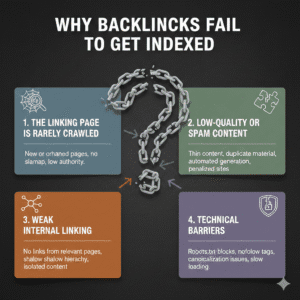
1. The Linking Page Is Rarely Crawled
If Google rarely visits the referring domain, your link may sit unnoticed for weeks or months. Low crawl frequency is common on:
- Thin content blogs
- Over-published sites
- Low authority domains
- Websites with poor internal linking
Google prioritizes high-value URLs. A guest post on a low-quality blog with many outbound links usually isn’t a top crawl priority.
2. Low-Quality or Spam Content
Backlinks placed on:
- Spun content
- AI-generated low-effort pages
- Thin articles
- Pages with excessive outbound links
They are far less likely to get indexed. Google avoids wasting crawl budget on low-value URLs.
3. Weak Internal Linking
Even a decent article may remain undiscovered if:
- It has no internal links pointing to it
- It’s buried deep in the site structure
- It’s not included in category pages or sitemap
Without internal signals, Googlebot may never find the page.
4. Technical Barriers
Common technical blockers include:
- robots.txt restrictions
- Nonindex tags
- Broken redirects
- Incorrect canonical tags
- Crawl errors
These issues prevent Google from indexing the page even if it discovers it.
Major Factors That Influence Backlink Indexing Speed
To master indexed backlinks, you must know what affects indexing speed.
Authority and Relevance of Source Website
Links from trusted, niche-specific sites are crawled and indexed quicker than random ones. Older domains with established trust typically outperform brand-new sites.
Crawl Frequency
Sites that update frequently and attract organic traffic are crawled more often. If bots crawl a site daily, your backlink may get indexed within days.
Site Health
A clean structure helps. Strong internal links improve navigation. Fast loading speed boosts user experience. Good technical health increases indexing chances.
Link Diversity and Natural Profile
A diverse, natural backlink profile signals legitimacy. Spammy link building can slow down indexing and hurt trust in the signal.
How to Index Backlinks Faster (Step-by-Step Strategy)
Here’s a simple way to index backlinks effectively and at scale.
1. Build High-Quality Backlinks First
The fastest way to index backlinks is to build better ones.
Prioritize:
- Contextual backlinks
- Niche-relevant placements
- Sites with real traffic
- Strong domain authority
- Editorial mentions
High-quality links often index naturally without aggressive tactics.
2. Use Google Search Console (For Properties You Control)
If you own or control the domain:
- Verify the site in Google Search Console
- Use the URL Inspection tool
- Paste the URL
- Click “Request Indexing”
This sends a crawl request directly to Google. It works best for Web 2.0 properties, microsites, or client-owned domains.
3. Leverage the Google Indexing API (Carefully)
The Google Indexing API is for structured content types. This includes JobPosting and BroadcastEvent. But many SEO professionals use it to trigger faster crawl requests.
Proper setup involves:
- Creating credentials in Google API Console
- Generating a JSON key
- Connecting via plugin or direct integration
When configured correctly, pages can get crawled within hours.
Use carefully and strategically.
4. Use Tiered Linking
Tiered linking increases crawl probability.
Example structure:
- Tier 1: Guest post or niche edit
- Tier 2: Web 2.0 linking to Tier 1
- Tier 3: Blog comments or contextual mentions linking to Tier 2
When Google indexes pages that link to your main backlink, interest in crawling goes up.
Avoid spam-heavy automation. Focus on quality support links.
5. Leverage Social Media Platforms
Google monitors high-activity platforms. Sharing your backlink page on:
can amplify crawl signals.
High engagement (comments, shares, replies) often correlates with faster indexing. Posting through active accounts works better than dormant profiles.
6. Use RSS Feeds and Ping Services
RSS (Real Simple Syndication) feeds can trigger crawl activity.
Strategy:
- Use built-in WordPress RSS feeds
- Submit to trusted RSS aggregators
- Use ping services to notify updates
When feeds update, search engines receive crawl signals.
7. Use Backlink Indexing Tools (Support, Not Replacement)
Third-party indexers can help push crawl signals, especially for Tier 1 links.
Popular tools include:
- IndexMeNow
- OmegaIndexer
- Indexification
- Instant Link Indexer
These tools typically use combinations of API pushes, crawl queues, and traffic simulation. Use them as support—not as your primary strategy.
What Doesn’t Work Anymore
Some outdated tactics waste time and money.
Pinging Alone
Simple pinging tools won’t index low-quality pages. Without crawl-worthy content, nothing changes.
Bookmarking Spam
Mass bookmarking sites rarely influence indexing anymore.
Heavy Automated Tier 2 Spam
Overusing aggressive automated links can get pages sandboxed or ignored entirely.
Waiting and Hoping
Unless the site has strong crawl priority, passive waiting is not a strategy.
How Long Do Backlinks Take to Get Indexed?
There is no universal timeline. It depends on:
- Authority of source
- Crawl frequency
- Site structure
- Content quality
- Technical health
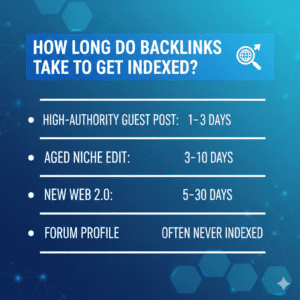
Typical timeframes:
- High-authority guest post: 1–3 days
- Aged niche edit: 3–10 days
- New Web 2.0: 5–30 days
- Forum profile: Often never indexed
In competitive niches, indexing speed becomes critical for ranking momentum.
How to Verify and Measure Indexing
Tracking is where professionals separate themselves from amateurs.
1. Manual Google Check
Search:
site: URL-of-referring-page
If it appears, it’s indexed. If not, it’s still pending.
2. Use SEO Tools
Use backlink reports and live link filters in:
- Ahrefs
- SEMrush
- Moz
Export referring page URLs and check index status in bulk.
3. Bulk Index Checking Tools
For large-scale operations, tools like:
- Scrapebox
- URL Profiler
- Index Checker
allow batch verification.
Track data in spreadsheets or Airtable with columns such as:
- Backlink URL
- Date built
- Indexed (Yes/No)
- Tier type
- Indexing method used
Over time, patterns emerge. You’ll discover:
- Which sites index faster
- Which anchor types get crawled quickly
- Which indexers work best
Monitoring and Troubleshooting Backlinks
If backlinks remain unindexed:
- Check for no index tags
- Confirm no robots.txt blocking
- Review canonical tags
- Inspect for broken redirects
- Analyze content quality
- Improve internal linking
Sometimes improving the linking page itself is the fastest way to trigger indexing.
The Real Goal: ROI from Every Link
Learning how to indexed backlinks is not about manipulation. It’s about ensuring your investment in link building produces measurable returns.
When Google indexes your backlinks:
- Authority transfers
- Rankings move
- Organic traffic increases
- Revenue grows
Competitors who ignore indexing lose equity every day. Those who track, audit, and optimize their indexing strategy gain a compounding advantage.
For a strong backlink strategy, follow a clear On-Page SEO Guide. This will help your site get ready to maximize link equity.
Final Thoughts
Backlinks only matter when they’re indexed.
Mastering how to indexed backlinks means focusing on:
- Quality link placement
- Crawlable pages
- Authority and relevance
- Active indexing methods
- Ongoing monitoring
Stop assuming links work automatically. Track them. Push them strategically. Refine your indexing system quarterly.
In competitive SEO, indexed links can determine if you rank high or stay invisible.
Frequently Asked Questions (FAQs)
- What does it mean to index a backlink?
Indexing a backlink means Google has discovered the page, crawled it, processed the link, and included it in its search index so it can pass SEO value. - Why aren’t my backlinks getting indexed?
Common reasons include low-quality content, rarely crawled pages, weak internal linking, technical issues (noindex tags, robots.txt), or links from low-authority domains. - How long does it take for backlinks to get indexed?
It varies. High-authority guest posts may index in 1–3 days, niche blogs 3–10 days, new Web 2.0 sites 5–30 days, while some forum links may never index. - Can third-party indexing tools guarantee backlink indexing?
No tool can guarantee indexing. They help trigger crawl activity, but quality placement, relevance, and site authority remain the primary factors. - How do I check if my backlinks are indexed?
Use Google’s site search operator (site:URL) or SEO tools like Ahrefs, SEMrush, Moz, or bulk index checkers like Scrapebox and URL Profiler.