

Navigating the digital landscape can be daunting, but implementing a comprehensive Technical SEO Checklist for Small Businesses is the most effective way to ensure your website isn’t just a digital brochure, but a high-performing lead generator. Technical SEO acts as the foundation of your entire digital presence. Without it, even the best content may struggle to rank on the first page of search results. By focusing on how search engines crawl, index, and perceive your site, you can bridge the gap between complex code and a genuine human connection with your customers.
1. Optimize Your First Impression: Titles and Meta Descriptions
Your first interaction with a potential customer often happens on a Search Engine Results Page (SERP). Every blog post or set of webpages needs a unique title that acts as a clickable headline to capture user intent. To boost your click-through rate (CTR), place your main phrase strategically within the 60-character limit. Below the title, your meta description serves as a persuasive snippet. While not a direct ranking factor, these headlines must balance keywords and user experience to convince users to click through.

2. Leverage Alt Text for Accessibility and Indexing
Images are essential visual content, but search engines can’t “see” them without help. To ensure digital inclusion, every HTML image description requires proper alt text. This is vital for accessibility, allowing the vision-impaired who use screen readers to understand your site. By providing semantic context through these attributes, you assist bots with crawling and indexing. Avoid keyword stuffing; instead, use natural labels to improve your visibility in image search results and adhere to modern web standards.
3. Master Core Web Vitals and Mobile Performance
In the modern era, Technical SEO Checklist for Small Businesses must prioritize the mobile experience. Metrics like Largest Contentful Paint (LCP), Cumulative Layout Shift (CLS), and Interaction to Next Paint (INP) are critical ranking factors. For example, a neighborhood café in early 2026 reduced bounce rates significantly by compressing images and deferring non-essential JavaScript. To speed up times, use modern formats like WebP over JPEGs and prioritize LCP images with fetchpriority=”high”. Aiming for a low Time to First Byte (TTFB) in milliseconds ensures a responsive layout that reacts quickly to user inputs.
4. Implement Local Business Schema Markup
Schema markup helps search engines identify your physical location, enabling rich results like star ratings and price ranges. This structured data connects your business to AI-driven platforms like ChatGPT. Using JSON-LD format via plugins like Rank Math or Yoast SEO allows you to include phone numbers, operating hours, and geo-coordinates without complex coding. Specificity is key; categorizing your site as a “MedicalClinic” or “Restaurant” increases the likelihood of appearing in map listings with a higher CTR.
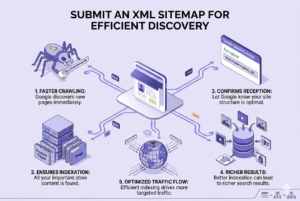
5. Submit an XML Sitemap for Efficient Discovery
An XML sitemap acts as a roadmap for search engines, listing every URL you want indexed. This is critical for service pages and neighborhood landing spots in competitive areas like Charleston or Mount Pleasant. Most CMS platforms like WordPress, Wix, or Squarespace have built-in functionality to generate this file. Once submitted to Google Search Console, it provides a clear directory for navigation, ensuring search bots don’t waste your crawl budget on low-value login or “thank you” screens.
6. Configure Robots.txt and Guide Search Bots
Your robots.txt file guides bots on what to crawl or skip. Use directives to block the backend (/wp-admin/) or internal search result pages to prevent waste. However, avoid the common pitfall of blocking CSS or JavaScript, as these are needed to render the mobile SEO version of your site. Testing and fine-tuning these paths in a staging environment ensures your high-priority offerings remain visible to the web crawler.
7. Prioritize Responsive Design and Mobile-First Indexing
Google now prioritizes the mobile version of your site for ranking. Whether your customers are exploring from an iPhone on King Street or a desktop at home, your layout must be fluid. Use CSS tools like Flexbox or Grid and the meta viewport tag to ensure readability. Ensure your metadata and NAP (Name, Address, Phone) are consistent across both versions, and avoid intrusive pop-ups that hinder the user experience on smaller screens.
8. Eliminate Duplicate Content with Canonical Tags
Having identical content across multiple pages-such as separate service pages for different neighborhoods with the same text-can dilute your SEO strength and lead to cannibalized rankings. To maintain your Technical SEO Checklist for Small Businesses, choose an authoritative master copy and use a rel=”canonical” tag in the <head> to point search engines to the preferred URL. If you move content, use a 301 redirect permanently to pass link equity to the new page.
9. Build a Logical Internal Linking Hierarchy
Internal links establish a hierarchy of authority on your site. Your homepage should link naturally to your main service pages and landing spots. This structure improves crawl efficiency and helps search engines find your most important content, such as customer testimonials. Avoid “dead-end” pages or “orphan” pages that have no incoming links. Using descriptive anchor text instead of vague phrases like “click here” is essential for both SEO and mobile tapping.
10. Monitor Performance with GSC and Analytics
Technical SEO isn’t a “set it and forget it” task; it requires ongoing monitoring. Free tools like Google Search Console and Google Analytics are essential for tracking search queries, traffic sources, and conversion rates. Regularly check for 5xx server errors or manual actions that could cause your site to be removed from search results. This data-driven approach allows you to make strategic changes with confidence, ensuring long-term growth.
Final Thoughts;
While you focus on these technical foundations, it is also important to remember that Top 10 Off-Page SEO Strategies That Work can further enhance your authority once your on-site house is in order. By following this Technical SEO Checklist for Small Businesses, you ensure your site is fast, accessible, and machine-readable, providing the ultimate payoff in visibility and customer trust. Whether you handle the implementation yourself or seek professional help for a foundation audit, staying vigilant about site health is the key to dominating your local market.
Watch Manual Actions report for Google spam policies, 5xx server errors, robots.txt blocks, and security issues. Submit dedicated XML sitemap like sitemap-locations.xml and integrate Google Analytics 4 for monitoring on-site behavior and conversions in a streamlined dashboard. Implementing these steps with SearchX, technical SEO services, or a Growth plan ensures better crawlability, local visibility, faster load times, smoother mobile experiences, better indexation, and improved rankings for Charleston Small Businesses. Don’t forget that even small enhancements like this form part of the Top 10 Off-Page SEO Strategies That Work, complementing your overall SEO strategy.
FAQs:
Q1: What is a Technical SEO Checklist for Small Businesses?
A Technical SEO Checklist is a step-by-step guide to optimize your website’s structure, speed, crawlability, and indexing for better search rankings.
Q2: Why is Technical SEO important for small businesses?
It ensures your site is fast, crawlable, and mobile-friendly, improving visibility in search results and increasing traffic and conversions.
Q3: How can I perform a Technical SEO Audit myself?
Use free tools like Google Search Console, Google Analytics, and Screaming Frog to uncover crawl errors, indexation issues, and speed bottlenecks.
Q4: What are Core Web Vitals and why do they matter?
Core Web Vitals-LCP, CLS, INP-measure page speed, visual stability, and interactivity, crucial for mobile users and local search rankings.
Q5: How do I add Local Business Schema Markup?
Use plugins like Yoast Local SEO, Rank Math, or Schema Pro to add structured data with your business name, address, phone, operating hours, and service areas.
Q6: Why should I submit an XML Sitemap?
An XML sitemap guides search engines to index your key pages efficiently, improving crawlability, local visibility, and search ranking.